KDP Interiors Printable Call Log Book: A Practical Guide to 6x9 No-Bleed Layouts
Creating a functional low-content book for Amazon KDP requires more than just uploading a generic template; it demands an understanding of how the end-user actually interacts with the physical product. When designing or selecting a KDP Interiors Printable Call Log Book, the primary goal is utility. Professionals, freelancers, and small business owners rely on these logs to track client communications, document legal conversations, or manage customer service inquiries. If the interior layout hinders this process through poor spacing, incorrect margins, or confusing formatting, the book becomes useless regardless of how attractive the cover appears. Success in this niche comes from balancing precise technical specifications with genuine user experience.
Understanding the 6x9 No-Bleed Specification
The most common point of failure for new KDP creators is misunderstanding what "No Bleed" actually entails for a 6″ x 9″ trim size. Many designers assume they can simply place content anywhere within the 6x9 canvas. However, a no-bleed setting means that all printed elements must remain within a specific safe zone. For a 6″ x 9″ call log book, you typically need a minimum margin of 0.375 inches on the top, bottom, and outside edges, and significantly more on the inside gutter.
A frequent mistake is treating the gutter margin as identical to the outer margin. In a 110-page book, the inner binding eats up space. If your call log columns extend too close to the spine, users will have to crack the book open aggressively to write in the entries, which damages the binding and creates a frustrating experience. Always add extra white space to the inner margin—typically 0.5 inches to 0.625 inches depending on page count—to ensure the writing area remains accessible and comfortable.
Optimizing the Two-Page Spread Layout
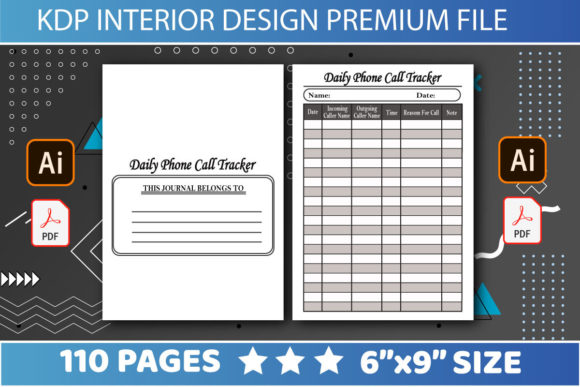
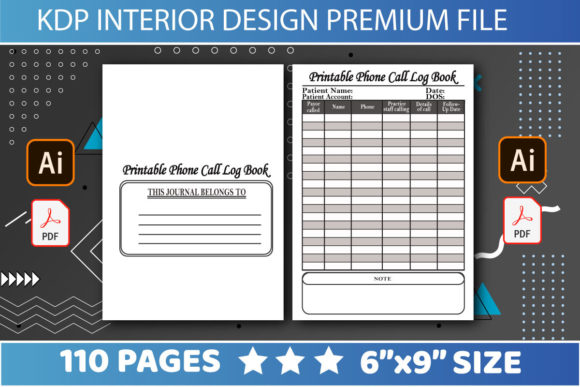
Call logs are rarely used in isolation. Users need to scan across lines to match a date with a phone number and a set of notes. Designing each page as an independent entity without considering the facing page is a critical usability error. When working with editable files in PDF, AI, or PPT formats, you must visualize the two-page spread as a single unit of information.
Consider the alignment of your table headers and writing lines. If the left-hand page has a heavy graphical border or a dark sidebar while the right-hand page is minimalist, the visual imbalance makes data entry difficult. Furthermore, ensure that horizontal lines align perfectly across the gutter. Misaligned rows force the eye to jump up or down when tracking information across the spread, reducing the efficiency of the log. A clean, symmetrical, or intentionally mirrored layout signals professionalism and attention to detail.
Evaluating Editable File Formats Correctly
One of the significant advantages of acquiring a KDP Interiors Printable Call Log Book package that includes PDF, AI, and PPT files is the ability to customize the interior. However, having multiple file formats often leads to workflow inefficiencies if not managed correctly. Beginners frequently attempt to edit the flattened PDF directly using basic viewers or non-professional tools, resulting in pixelated text, shifted layers, and unprofessional output.
Always prioritize vector-based source files for structural changes. Adobe Illustrator (AI) files are superior for adjusting line weights, modifying table structures, or changing fonts without losing resolution. PowerPoint (PPT) files offer accessibility for those without design software but come with limitations regarding precise margin control and print-ready export settings. Use PPT only for minor text edits or simple color swaps. If you need to restructure the log fields or adjust the safe zones, revert to the AI or original layered PDF source. Relying solely on a flattened PDF for major modifications is a shortcut that compromises print quality.
Content Relevance Over Generic Templates
A pervasive issue in the low-content market is the use of overly generic interiors that do not serve a specific purpose. A call log designed for a real estate agent differs vastly from one intended for a nurse or a tech support specialist. Simply labeling a product as a "Call Log" without tailoring the column headers to a specific audience reduces its perceived value and marketability.
Before finalizing your 110-page layout, audit the fields included in the log. Does it include a column for "Follow-Up Required" or "Outcome"? These are high-value fields for sales professionals but irrelevant for personal call screening. Conversely, a medical call log might require HIPAA-compliant phrasing or specific triage categories. Customizing the editable template to reflect real-world workflows transforms a generic commodity into a specialized tool. This specificity not only improves user satisfaction but also helps distinguish your listing in search results through better keyword relevance and positive reviews citing actual utility.
Technical Checks Before Publishing
Even with a perfect design, technical oversights during the upload phase can ruin a project. Because this resource is marketed as easily editable, there is a risk of introducing errors during the customization process. Before uploading your final PDF to KDP, perform a rigorous pre-flight check.
- Verify Page Count Consistency: Ensure your document is exactly 110 pages or matches the metadata you intend to enter. Adding or removing pages during editing without updating the spine width calculation will cause cover misalignment.
- Check Font Embedding: When exporting from PPT or AI, ensure all fonts are embedded or outlined. Missing fonts can cause KDP’s system to substitute typefaces, destroying your carefully planned spacing and legibility.
- Test Print at Home: Never rely solely on the digital previewer. Print a sample section at actual size (100% scale) on standard paper. Measure the margins with a ruler. Write in the log with a pen to test line spacing. Digital screens deceive; physical measurement confirms usability.
- Validate Black Richness: If your log uses black lines or tables, ensure they are set to 100% K (black) rather than rich black (CMYK mix). Rich black can appear muddy or cause registration issues on standard KDP paperback printing.
Balancing Density and White Space
There is a temptation to maximize the number of log entries per page to increase the perceived value of the 110-page book. Cramming thirty rows onto a 6x9 page with standard margins leaves insufficient vertical space for handwriting. Most adults cannot write legibly in spaces smaller than 0.25 inches. Overcrowded interiors lead to messy logs and negative customer feedback.
Prioritize readability over density. Fewer, well-spaced entries per page are preferable to a cramped layout that frustrates the user. Remember that the value proposition of a printable call log book lies in its organization, not its capacity. A user would rather buy a second volume than struggle to decipher their own handwriting in a poorly spaced ledger. By respecting the physical constraints of the 6x9 format and the ergonomic needs of the writer, you create a product that serves its intended function effectively and encourages repeat purchases.