Designing Effective KDP Interiors Body Measurement Tracker Templates for Print and Digital Use
The Strategic Value of Standardized 6x9 Dimensions
When creating low-content or medium-content books for Amazon KDP, the physical dimensions of the interior dictate not only the user experience but also the manufacturing cost and marketability. The 6″ x 9″ trim size has emerged as the industry gold standard for health and fitness journals, specifically for a KDP INTERIORS BODY MEASUREMENT TRACKER. This dimension offers a unique balance between portability and writable surface area. Unlike larger 8.5″ x 11″ formats which can feel cumbersome for daily tracking, or smaller 5″ x 8″ sizes that restrict data entry space, the 6x9 format fits comfortably in gym bags, purses, and bedside tables while providing ample room for detailed metrics.
For creators and business owners, this size optimizes royalty potential. It falls within standard printing tiers that keep production costs low, allowing for competitive pricing on the final consumer product. From a design perspective, the 6x9 canvas requires intentional layout strategies. Margins must be calculated precisely to account for binding gutter space, ensuring that measurement tables and progress charts remain legible and accessible without being swallowed by the spine. When utilizing editable files in AI, PPT, or PDF formats, designers should set up artboards at exact trim size with appropriate bleed settings disabled for no-bleed interiors, maintaining a safe zone of at least 0.375 inches from the edge.
Structuring Content Across 110 Pages
A page count of 110 pages is a strategic sweet spot for body measurement trackers. This volume provides sufficient duration for tracking—typically covering three to four months of weekly logs or six months of bi-weekly entries—without making the book feel like an overwhelming commitment. For professionals selling these templates, 110 pages justifies a mid-tier price point while keeping printing expenses manageable. The structure within these pages should follow a logical progression that supports behavioral change rather than mere data collection.
Effective layouts often dedicate the first ten to fifteen pages to instructional content, goal setting, and baseline measurements. The core tracking section utilizes repetitive, consistent spreads that reduce cognitive load for the user. When editing source files, creators should utilize master slides or parent pages to ensure alignment across all 110 pages. Consistency in grid lines, font sizing, and header placement is critical; even minor deviations can make a printed tracker appear unprofessional. The remaining pages can serve as monthly review sections, progress photo logs, or notes, adding value beyond simple number tracking and increasing the perceived utility of the publication.
Implementing No Bleed Settings for Clean Production
Understanding the technical distinction between bleed and no bleed is fundamental when preparing a KDP INTERIORS BODY MEASUREMENT TRACKER for publication. A "no bleed" setting means that all content, including background colors, borders, and graphics, must stop short of the trim edge. This is the preferred specification for most measurement trackers because it eliminates the risk of crucial data tables or writing lines being cropped during the mechanical trimming process. It also simplifies the design workflow for those using PowerPoint or basic PDF editors, as there is no need to extend artwork beyond the canvas boundaries.
When working with no bleed files, designers must establish a robust internal margin system. For a 6x9 book with 110 pages, the inside gutter margin should typically be no less than 0.375 inches, though 0.5 inches is safer for usability. Outside margins should mirror this safety buffer. In editable AI or PPT files, guide layers should be locked to prevent accidental movement during customization. This technical precision ensures that when a consumer opens the physical book, the measurement fields are perfectly centered and fully usable. Errors in bleed configuration are among the most common reasons for KDP rejection or poor customer reviews, making adherence to no bleed specifications a non-negotiable aspect of professional template creation.
Leveraging Multi-Format Editable Files
The availability of source files in PDF, AI (Adobe Illustrator), and PPT (PowerPoint) formats significantly expands the accessibility and commercial viability of tracker templates. Each format serves a distinct segment of the creator economy. Adobe Illustrator files offer vector-based precision, allowing graphic designers to modify line weights, typography, and layout grids without quality loss. This is essential for creators who want to rebrand a generic KDP INTERIORS BODY MEASUREMENT TRACKER with custom logos, unique color schemes, or proprietary tracking methodologies. Vector scalability ensures crisp printing regardless of future size adjustments.
PowerPoint files democratize the editing process for entrepreneurs and coaches who lack advanced design software. PPT templates allow users to drag-and-drop elements, edit text boxes, and rearrange tracking tables using familiar office tools. This lowers the barrier to entry for fitness professionals wanting to create branded client resources. PDF files serve as the universal output format and, when properly tagged, can function as interactive digital planners for tablet users. Providing all three formats maximizes the template’s market reach, catering to both design-savvy publishers and practical end-users who prioritize ease of modification over granular design control.
Functional Design Elements for User Retention
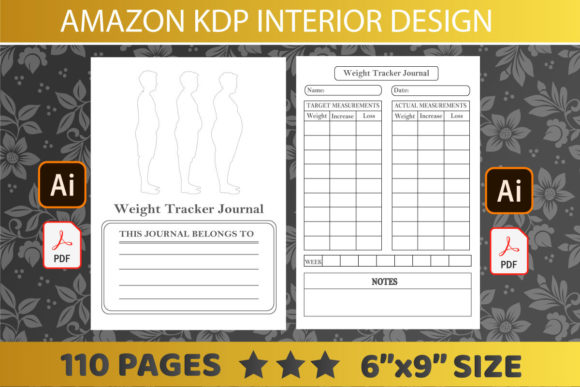
The success of a body measurement tracker lies in its functional ergonomics. Users abandon trackers that are tedious to complete or difficult to interpret. When designing or editing the interior, prioritize clarity over decoration. Input fields should be sized appropriately for handwriting; boxes that are too small frustrate users and lead to messy, illegible records. Standard measurements such as chest, waist, hips, arms, and thighs require dedicated columns with clear unit indicators (inches or centimeters). Including visual body diagrams on introductory pages helps standardize how users take measurements, reducing data variability caused by inconsistent technique.
Progress visualization is another critical retention feature. While raw numbers provide data, graphs and charts provide motivation. Incorporating simple line graph templates within the 110-page structure allows users to plot trends over time. In editable AI or PPT files, these charts should be constructed using native shapes or chart tools rather than static images, enabling users to customize axis labels and scales. Additionally, integrating qualitative tracking sections—such as energy levels, sleep quality, or workout notes—contextualizes the quantitative data. This holistic approach transforms a simple logbook into a comprehensive wellness tool, differentiating your product in a saturated marketplace.
Customization Workflows for Diverse Niches
One of the primary advantages of easily editable templates is the ability to adapt a single base design for multiple niche audiences. A generic KDP INTERIORS BODY MEASUREMENT TRACKER can be rapidly modified to serve specific demographics. For postpartum recovery journals, editors might add diastasis recti checks and pelvic floor symptom tracking. For bodybuilding competitors, the template could be adjusted to include body fat percentage calculations and posing practice notes. Senior fitness trackers might feature larger fonts, higher contrast lines, and simplified metrics focused on mobility and balance rather than aesthetic measurements.
This modular approach to content creation maximizes return on investment for template purchasers. By altering headers, adjusting column labels, and swapping introductory content in PPT or AI, a single 6x9, 110-page asset can generate dozens of unique products. Educators and researchers can adapt these trackers for clinical studies or classroom health projects, removing commercial branding and adding institutional identifiers. Business owners can white-label the interiors for corporate wellness programs. The key to efficient customization is maintaining a clean, layered file structure where variable elements are clearly separated from static framework components, streamlining the adaptation process without compromising the underlying no bleed layout integrity.
Technical Considerations for Print Quality and Usability
Beyond dimensions and file formats, the tactile experience of the printed tracker influences long-term usage. Paper weight and opacity are determined by KDP’s printing options, but designers can optimize layouts to mitigate potential show-through issues. On 6x9 no bleed interiors, avoiding heavy solid black backgrounds or dense ink coverage on alternating pages prevents ghosting that could obscure measurement entries on the reverse side. Using lighter gray tones for grid lines and table borders instead of pure black reduces ink density while maintaining visual structure. This consideration is particularly important for the 110-page format, where paper thickness is standardized.
Typography choices also impact print legibility. Sans-serif fonts generally reproduce more cleanly at small sizes on standard book paper. Font sizes for data entry fields should never drop below 9pt, with 10-11pt being optimal for handwritten annotations. When testing editable PDF or PPT files before final export, always print a sample page at actual size to verify that screen-readable text translates effectively to physical media. Digital zoom can mask readability issues that become apparent only in hand. Ensuring that the KDP INTERIORS BODY MEASUREMENT TRACKER performs flawlessly in physical form builds trust with end-users and reduces negative feedback related to usability defects. Attention to these production-level details separates amateur submissions from professional-grade publishing assets.