Evaluating the KDP Interiors Project Planner Logbook: Specs, Customization, and Practical Fit
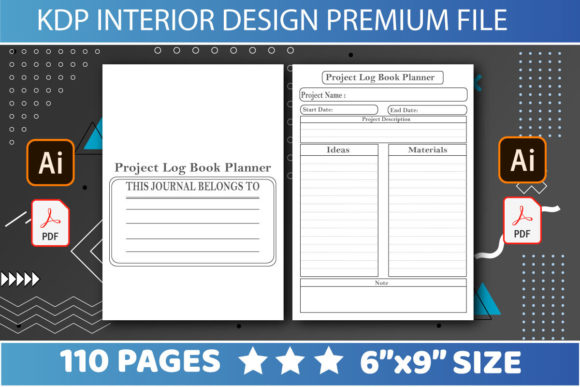
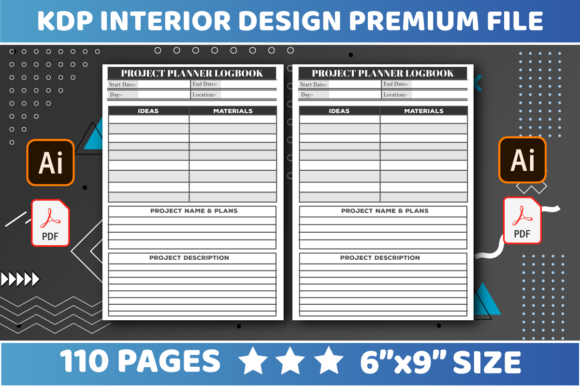
Selecting the right interior template for Amazon KDP requires balancing technical compliance with end-user utility. For creators targeting the productivity niche, the KDP Interiors Project Planner Logbook presents a specific set of parameters that distinguish it from generic journal templates. This resource is defined by its 6″ x 9″ trim size, 110-page count, and three distinct layout settings, all delivered in editable PDF and AI formats without bleed. Understanding these specifications is essential for determining whether this asset aligns with your publishing strategy or if an alternative format better serves your target audience.
Unlike broad-stroke planners that offer vague weekly spreads, this logbook is engineered for granular project tracking. The distinction matters significantly when evaluating market fit. While standard notebooks rely on lined or dotted paper, a project planner must provide structured frameworks for milestones, task breakdowns, and progress monitoring. The inclusion of source files (AI and PDF) shifts this product from a static commodity to a foundational design asset, allowing publishers to adapt the content rather than simply republishing a saturated template.
Technical Specifications and Platform Compliance
The technical foundation of any KDP interior dictates both the printing cost and the user experience. The 6″ x 9″ dimension selected for this project planner logbook represents a strategic middle ground in the low-content book market. When comparing this to larger formats like 8.5″ x 11″, the 6″ x 9″ size offers superior portability, making it viable for professionals who need to carry the logbook to job sites, meetings, or co-working spaces. However, this compact footprint imposes strict spatial constraints that influence how much information can be comfortably recorded per page.
The 110-page count is another deliberate specification. In the context of KDP printing economics, this page count keeps the production cost low while providing sufficient volume for approximately three to four months of active project tracking. Thicker books often command higher price points to maintain royalty margins, which can reduce conversion rates in competitive niches. Conversely, books under 100 pages can feel insubstantial to buyers expecting a durable tool. The 110-page configuration avoids both pitfalls, positioning the KDP Interiors Project Planner Logbook as a functional quarterly tool rather than a disposable notepad.
The "No Bleed" setting is perhaps the most critical technical factor for new publishers. Bleed refers to content extending beyond the trim line, requiring precise alignment during manufacturing. By utilizing a no-bleed configuration with appropriate safety margins, this template significantly reduces the risk of rejection during KDP’s automated review process. For creators comparing options, it is worth noting that while full-bleed designs can look more premium, they increase formatting complexity and error rates. The no-bleed approach prioritizes consistency and ease of assembly, which is particularly valuable when managing multiple SKUs or iterating quickly based on market feedback.
File Format Flexibility and Editability
Access to both PDF and AI (Adobe Illustrator) files fundamentally changes the value proposition of this interior. Many KDP interiors are sold as flattened PDFs only, limiting the buyer to using the template exactly as designed. While a ready-to-upload PDF offers speed, it restricts differentiation. In a marketplace where duplicate content is increasingly penalized by algorithms and ignored by savvy shoppers, the ability to edit is not merely a convenience—it is a necessity for long-term viability.
- Vector-Based Editing: The AI file format ensures that all lines, tables, and text boxes remain vector objects. This allows for infinite resizing without pixelation and enables color adjustments to match specific brand aesthetics or cover designs.
- Content Adaptation: Users can modify prompts, change header terminology, or adjust column widths to suit specific industries such as construction, software development, or event planning.
- Hybrid Workflow: Publishers can use the PDF for immediate testing and the AI file for creating differentiated versions once a niche proves profitable.
When evaluating alternatives, consider the software requirements. Adobe Illustrator has a steeper learning curve than Canva or basic PDF editors. If you lack access to vector editing software or the skills to use it, the AI component of this package may represent unused value. In such cases, a Canva-compatible template might be a more practical choice despite offering less professional-grade output. However, for those with the requisite tools, the AI format provides a level of typographic and structural control that browser-based design platforms cannot match.
Comparative Analysis: Structured Logbooks vs. Generic Planners
To make an informed decision, it is necessary to compare the KDP Interiors Project Planner Logbook against other common categories in the productivity space. The market is saturated with undated journals, habit trackers, and daily planners, each serving different cognitive functions. A project logbook differs primarily in its focus on deliverables and timelines rather than general organization or wellness.
Generic daily planners typically allocate equal space to every day, assuming uniform activity levels. Project management, however, is inherently non-linear. Some days require extensive brainstorming and sketching, while others involve simple checklist verification. The three settings included in this logbook likely address this variance by offering different layout densities. When comparing this to a standard diary-style planner, the project-specific structure reduces friction for users who find traditional calendars inadequate for tracking multi-phase workflows.
Conversely, specialized industry logbooks (e.g., nursing logs, fitness trackers, or financial ledgers) offer deeper domain specificity. If your target audience requires regulatory compliance fields or highly technical data entry, a general project planner may be too broad. The strength of this particular template lies in its versatility; it suits knowledge workers, freelancers, and small business owners managing diverse initiatives. It trades niche depth for wider applicability. Publishers must decide whether to target a broad professional demographic with this flexible tool or seek a hyper-specialized template for a narrower audience.
Evaluating the Three Layout Settings
The inclusion of three distinct settings or layouts within the 110-page structure suggests a modular approach to project tracking. Effective project planning rarely fits into a single grid. When assessing this feature, consider how these layouts interact. Do they transition logically from high-level goal setting to daily execution? Or do they serve as alternative options for different user preferences?
In comparison to single-layout interiors, multi-setting templates offer higher perceived value and better user retention. A buyer is more likely to utilize a book that adapts to their changing needs throughout a project lifecycle. However, multi-layout books also present a navigation challenge. Without proper indexing or clear section headers—which must be added during the editing phase—users may find the variety confusing rather than helpful. When using this template, plan to add front-matter navigation or tab markers to maximize the utility of the three distinct settings.
Decision Factors: When This Template Is the Right Choice
Choosing the KDP Interiors Project Planner Logbook should be driven by specific publishing goals and resource availability. This template is best suited for creators who view interiors as a starting point for brand building rather than a final product. The combination of editable vectors and a safe, no-bleed print specification makes it an ideal sandbox for testing productivity niches without significant upfront design investment.
This resource is particularly appropriate if:
- You have access to Adobe Illustrator and possess intermediate vector editing skills.
- You are targeting mobile professionals who prioritize portability over expansive writing space.
- You want to minimize printing costs while maintaining a page count that justifies a mid-range price point.
- You intend to create a series of related products by modifying the base template for different verticals.
However, this template may not be the optimal choice in every scenario. If your business model relies exclusively on high-volume, zero-effort uploads, the requirement to customize AI files adds unnecessary friction. Similarly, if you are targeting users who prefer digital planning on tablets, a print-focused no-bleed layout lacks the interactive elements (hyperlinks, embedded widgets) required for digital success. Additionally, creators focusing on large-format workbooks for educational or therapeutic purposes will find the 6″ x 9″ dimensions too restrictive for exercises requiring ample margin space.
Tradeoffs and Practical Limitations
Every design choice involves compromise. The no-bleed safety margin, while protecting against print errors, results in a visible white border around the content. Some consumers perceive this as less polished compared to edge-to-edge printing. To mitigate this, effective cover design and interior typography must compensate for the lack of visual bleed. Furthermore, the 110-page limit means the book is finite; users completing multiple projects simultaneously may fill it faster than anticipated. Publishers should clearly communicate the intended duration and capacity in their listing descriptions to manage expectations and reduce returns.
Finally, the editability of the file places the burden of quality assurance on the publisher. Modifying vector paths or fonts can inadvertently alter spacing or alignment. Unlike a locked PDF, an open AI file requires diligent pre-flight checking before upload. Users must verify that all modifications remain within the safe zone and that text remains legible at the final print size. This additional step demands time and attention but ultimately yields a product that stands apart from unmodified competitors.
Ultimately, the KDP Interiors Project Planner Logbook serves as a robust infrastructure for publishers willing to invest effort in customization. Its specifications reflect a balanced approach to the physical and economic realities of KDP publishing. By understanding its strengths in portability and flexibility, alongside its limitations in size and required skill set, creators can accurately assess its fit within their broader catalog strategy. The decision should rest not on the template alone, but on how well its parameters align with your specific audience’s workflow and your own production capabilities.